Wing dimensions INPUT
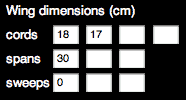
The wing of your model may have 1, 2 or 3 panels by side.
For a single-panel wing, enter root and tip cord, panel span (by side) and
leading edge sweep in centimeters. Leave other entries empty.
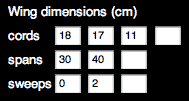
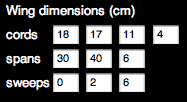
If your wing has 1 more panel, add 1 tip cord, 1 span and 1
sweep, and so on. Note that in the case of a multi-panel wing, sweep distance for each panel is measured from
the root leading edge of the local panel.
Use the tab key to easily navigate from one input field to the next.
OUTPUT
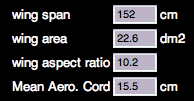
SPP computes total wing span, wing area and wing aspect
ratio. Moreover, the mean aerodynamic chord (MAC) is computed, which will be
useful for further center of gravity and stability calculations.
|
|
|
|
| necessary input for 1 panel wing | ... for 2 panel wing | ... for 3 panel wing | output |
Center of Gravity (CG) INPUT
This input is automatically set to 33% of MAC, a value that
will give pitch trim and stability for a vast majority of models. However, you
can set this entry to any value you like (e.g. 20% if your model is a flying
wing ; see FAQ).
OUTPUT
The corresponding position of CG is computed, in centimeters
from the leading edge of root cord. This is the point where you should balance
your model for pitch trim and stability.
Tailplane (TP) dimensions INPUT
As for wing, enter root cord, tip cord, span (by side) and
leading edge sweep of tailplane. Moreover, enter the lever arm of
tailplane (which is the rear length of the fuse), measured from the root
cord leading edge of wing to the root cord leading edge of TP.
OUTPUT
Three variables are computed, which give information on the
pitch stability of your model. The most useful is Tailplane ratio: this compares the product of TP area with lever
arm to the product of wing area with MAC. Hence, TP ratio measures the
stabilizing effect of your TP. For a given wing, increasing TP dimensions
or lever arm will increase TP ratio. On most models, plane or glider, TP
ratio should be 0.5-0.6. Higher values (up to 0.7) can be useful for models
needing very straight flight trajectory (e.g. F3A aerobatic planes). Lower
values (down to 0.4) , obtained with lower TP area, can be adapted for models
on which drag needs to be highly reduced (such as pylon racers or some
gliders), but should be used carefully.
CG rear limit indicates the point (from wing root cord leading edge) beyond which you should
not place the CG, or your model will probably become unstable. This point is
sometimes called the "aerodynamic center" of your model, and its
position directly depends on the TP ratio (the higher the TP ratio, the
further rear the CG limit). By comparing this output to the calculated CG
(see above), you will get an idea of the range you have to fine-tune the CG
during flight-tests.
Static margin is
somewhat redundant with the previous output. It is simply a measure of the
distance between CG and CG rear limit, as a percentage of the wing MAC.
Hence, static margin should always remain positive, or the model becomes
unstable. For most models, with a TP ratio of 0.6 and a CG at 33% of MAC,
static margin usually is around +15%, thus you do not need to bother with this
output. Static margin is mainly useful for designing flying wings (see FAQ).
Aircraft INPUT
Here you choose between plane and glider. This modifies the
computation of lift and drag forces (e.g. gliders have lower fuse drag), as
well as recommended power. In the mass entry,
you should put the total estimated mass of your model (including airframe,
radio and motor plant). As it is one of the most important input variables, you
should realistically estimate the mass, which is not always easy if you work on
a new project (and not on an existing airframe). Mass is used for flight speed
calculation, as well as recommended input power.
OUTPUT
Wing loading is
simply the ratio of mass to wing area. Its value can be useful to compare
with existing models.
Min flight speed is
an estimation of the minimal flight speed of your model (i.e. stall speed), for
usual airfoils. It mainly depends on wing loading (higher wing loading
increases Min flight speed). For a glider, Min flight speed gives an idea of
the thermaling speed. For a plane, Min speed is useful to know the minimal landing speed, a critical
issue for beginner or intermediate pilots (landing a model aircraft at 50 km/h
or more requires some flying
skills).
Max glide ratio is
mainly useful for gliders (this is the ratio of height loss to the achieved
horizontal distance). It is calculated for usual airfoils, and mainly depends
on wing aspect ratio (higher aspect ratio decrease induced drag and hence
increase glide ratio. However do not increase aspect ratio too much on small
models, as airfoils do not work properly on very small cords - See
"COMMENT OUTPUT" below). SPP also computes the flight speed at
which the max glide ratio is achieved, which is an indication of the
"mean" (and optimal) flight speed of your glider. As Min flight
speed, max glide ratio speed directly depends on wing loading. By the way, remember that the mean flight speed also
determines the wind speed at which your model will be able to fly comfortably.
For example, a very light glider with a max glide ratio speed
of about 20 km/h will have a hard time at the slope in windy days.
Even for planes (especially gas-engine ones), max glide
ratio is interesting, as it determines how much horizontal distance you will be
able to achieve if your motor stops at a given height.
Motor INPUT
This part is useful for Electric models, which see their
number increase more and more nowadays, thanks to much improvement in
efficiency of motors and batteries. Choose between brushed ans brushless motor,
and then enter the voltage and current at which you plan to use your motor. Of
course, nominal values of the motor, battery and ESC should not be exceeded.
OUTPUT
Input power is
simply the product of voltage and current you have entered. You can compare this
value to the recommended range,
which is calculated from the mass of your model, based on usual power/mass
ratios (80-250 W/kg for gliders, 120-300 W/kg for planes). Lower values in the
range will be ok for beginner motorgliders or slowflyer planes. On the other
hand, higher power values in the recommended range will be adapted to high
performance models, such as hot motorgliders, 3D aerobatic planes or pylon
racers. For most sport models and trainers, the best value falls in-between
extreme power values.
Please be aware that high electric input power will not be
helpful at all without an appropriate selection of propeller, which should be
conducted according to motor manufacturer recommendations (or according to
advanced computations which are not included in SPP yet).
SKETCH OUTPUT
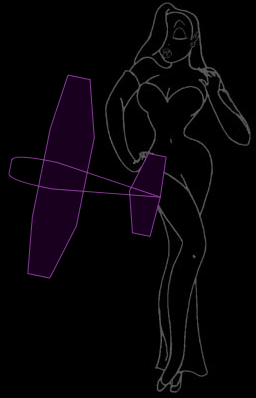
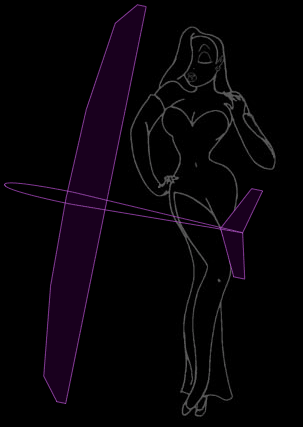
The wing and TP are drawn according to the entered
dimensions. This is meant to help figure out what your project looks like. The
170 cm (5 1/2 feet) tall pinup seems absolutely necessary to evaluate the
overall size of the model ...
Moreover, an outline of a standard fuse is drawn. Although
standard fuse drag is always included in SPP flight performance computations,
this fuse representation is decorative only. Thus, if it does not look like
what you plan to construct at all (e.g. jet planes), you can erase it by
unchecking the "Draw fuse" checkbox.
 |
 |
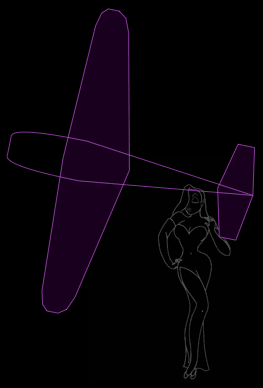 |
| a 90 cm parkflyer | a 180 cm glider | a 280 cm warbird |
COMMENT OUTPUT
In all cases, the Reynolds number (Re)